

ByAnish
Google Chrome + Gemini: New Privacy Tracking Warning
A new privacy warning has been issued for over 2 billion Google Chrome users, as the browser’s latest upgrade integrates Gemini AI directly into Chrome. According to a report by Surfshark, Chrome with Gemini now collects 24 types of sensitive data on smartphones — more than any other AI-powered browser.
🔍 What Data Is Being Collected?
The report highlights that Chrome and Gemini can log:
- Your name, device ID, and location
- Browsing & search history
- Product interactions and purchase history
- Other identifiers linked directly to your personal profile
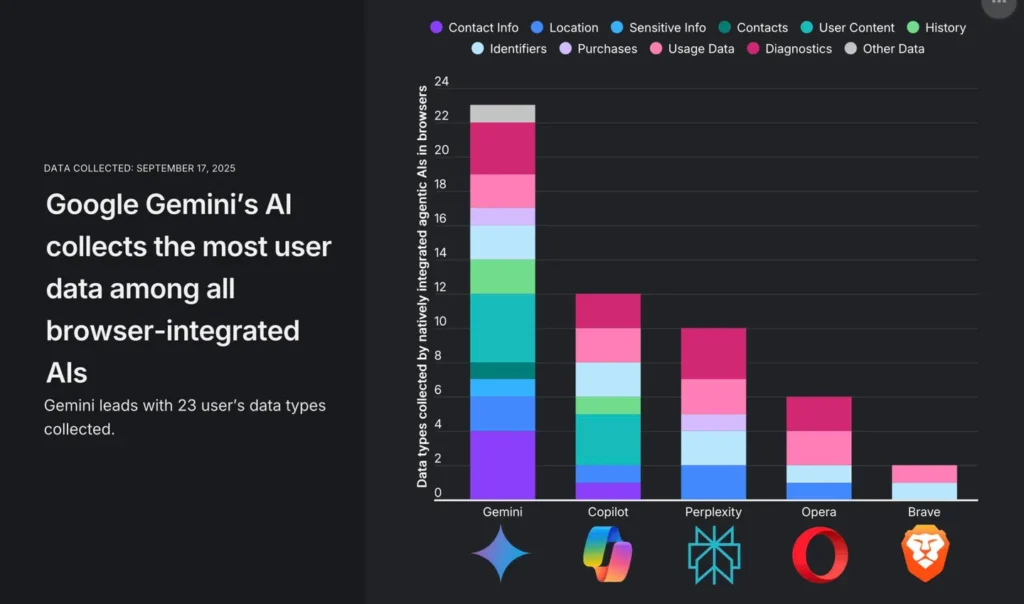
This level of tracking exceeds Microsoft Edge with Copilot, which gathers less than half the amount of data. Competing browsers like Opera, Brave, and Perplexity also collect significantly less.
⚠️ Why It Matters
The integration of Gemini is being marketed by Google as the “biggest upgrade in Chrome’s history.” But the tradeoff comes in user privacy. Surfshark warns that installing agentic AI tools — whether built-in like Gemini or as extensions like ChatGPT — exposes even more of your data to third parties.
Apple, meanwhile, is leaning into privacy as a competitive edge. With Safari on iOS 26, Apple has made anti-fingerprinting technology default, further distancing itself from Google’s data-hungry approach.
🔧 What You Can Do
Google says “Gemini in Chrome activates only when you ask” by clicking the icon or using a shortcut. But once activated, your information is collected. To limit exposure:
- Go to Settings > AI Innovations > Gemini in Chrome and manage permissions.
- Adjust location, camera, and microphone access under Chrome’s privacy settings.
- Visit Gemini Apps Activity to restrict data retention to 72 hours.
Still, experts caution there’s no way to fully opt out once Gemini is embedded in Chrome.
FAQ Section
Q1: What is Gemini in Chrome?
Gemini is Google’s AI assistant now integrated into Chrome, designed to help with tasks but also tied to extensive data collection.
Q2: What kind of data does Chrome with Gemini collect?
It can track your name, device ID, location, browsing and search history, product interactions, and even purchase history.
Q3: Can I disable Gemini in Chrome?
You can limit its activity in Chrome’s settings, but you cannot fully disable Google’s data collection once Gemini is enabled.
Q4: How does Chrome compare to other AI browsers?
Surfshark found that Chrome with Gemini collects more than double the data of Microsoft Edge with Copilot, and far more than Opera, Brave, or Perplexity.
Q5: How can I protect my privacy?
Adjust settings in Chrome, manage Gemini’s data retention (72 hours max), and consider alternatives like Safari or Brave for stronger privacy.
About the Author
Anish is the founder of TechBoltX, sharing mobile gaming rewards, guides, and daily updates.