ByAnish

If You See This Warning, Your Facebook Is Being Hacked
If You See This Warning, Your Facebook Is Being Hacked: StealC v2 Alert 2025
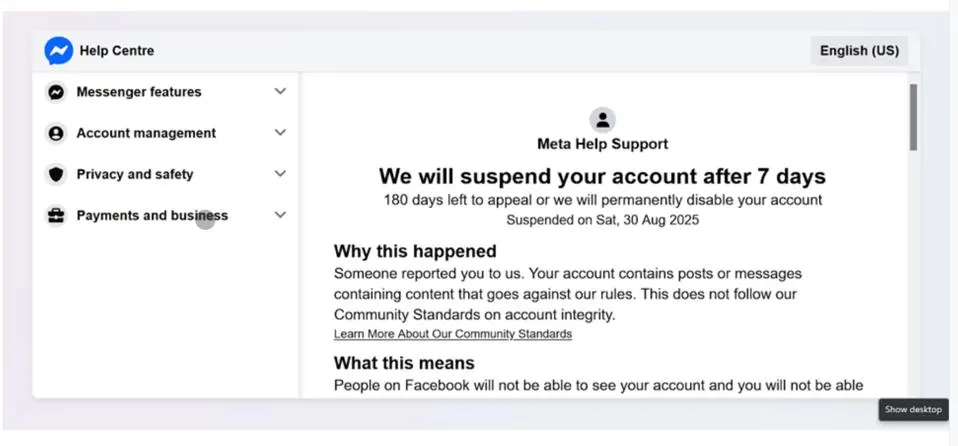
A new wave of Facebook phishing attacks is targeting users in 2025 with StealC v2 malware, designed to steal passwords, cryptocurrency wallets, and personal information. This guide explains how the scam works, signs to watch for, and protective measures to secure your account.
What Is the StealC v2 Facebook Phishing Scam?
Cybersecurity experts from Kaspersky have detected a sophisticated phishing campaign affecting users worldwide. Attackers send fake Facebook account suspension warnings, prompting users to download malware disguised as an “appeal script.”
StealC v2 malware is an advanced information-stealing program, capable of harvesting:
- Passwords from Chrome, Firefox, Edge, Opera, and more
- Cryptocurrency wallet data
- Screenshots across multiple monitors
- Files from gaming apps, email clients, VPNs, and messengers
The malware uses RC4 encryption and geographic targeting to evade detection and operate stealthily.
How the Scam Works
- Fake Warning Message: Users receive a message claiming their account will be “suspended” or “blocked.”
- Fraudulent Appeal Button: Clicking redirects to a convincing fake Facebook support page.
- Malware Download: Users are tricked into installing StealC v2.
- Data Theft: The malware steals passwords, cookies, crypto data, and more.
Warning Signs of Facebook Phishing
Message Red Flags:
- Generic greetings: “Facebook User” instead of your name
- Urgent threats: “Account will be deleted in 24 hours”
- Poor grammar and typos
Technical Indicators:
- URLs not matching
facebook.com - Redirect chains leading to unknown domains
- Executable files (.exe, .zip) attached
Common Scam Phrases:
- “Your account has been suspended for violating Facebook terms”
- “24 hours left to request review”
- “Urgent: Last chance to avoid Facebook account termination”
- “Is this you?” or “What are you doing in this video?”
How to Protect Your Facebook Account
Immediate Measures:
- Enable Two-Factor Authentication (2FA)
- Use SMS codes, authenticator apps, or hardware keys
- Use Strong, Unique Passwords
- Avoid reusing passwords; consider a password manager
- Verify Before Clicking Links
- Access Facebook manually; don’t click suspicious messages
Advanced Protection:
- Keep browsers, OS, and antivirus software updated
- Limit sharing personal info online
- Install anti-phishing browser extensions
What to Do If Targeted
- Change Your Password immediately.
- Check Recent Activity and log out suspicious sessions.
- Run Antivirus Scans on all devices.
- Monitor Financial Accounts for unusual activity.
- Report the Incident to Facebook and local authorities.
Account Recovery:
- Use Facebook’s official recovery tools
- Provide alternate contact info and identification if requested
Facebook’s Official Guidance
- Facebook never asks for passwords via unsolicited messages.
- Account violations result in temporary restrictions, not immediate suspension.
- Always use official Facebook support channels for account issues.
Broader Cybersecurity Context
Phishing attacks like StealC v2 are part of a global trend where attackers exploit fear and urgency to trick users. These campaigns demonstrate the growing sophistication of cybercriminal tactics in 2025.
Long-Term Best Practices:
- Conduct regular security checkups on accounts
- Stay updated on emerging phishing threats
- Backup critical data to external drives or cloud storage
For Businesses:
- Train employees on social media safety
- Implement threat protection and incident response protocols
- Establish clear social media policies
Key Takeaways
- StealC v2 malware is a major threat to Facebook users in 2025.
- Always verify messages claiming account suspension through official channels.
- Enable 2FA, use strong passwords, and keep software updated.
- Report suspicious activity immediately.
Remember: If you receive a suspicious message claiming your Facebook account is blocked or suspended, do not click links or download files. Access Facebook manually or contact official support to stay safe.