
ByAnish
Instagram Map: Share Location Safely, Explore Nearby Content
Instagram Map Arrives: How to Use It Safely and Stay in Control
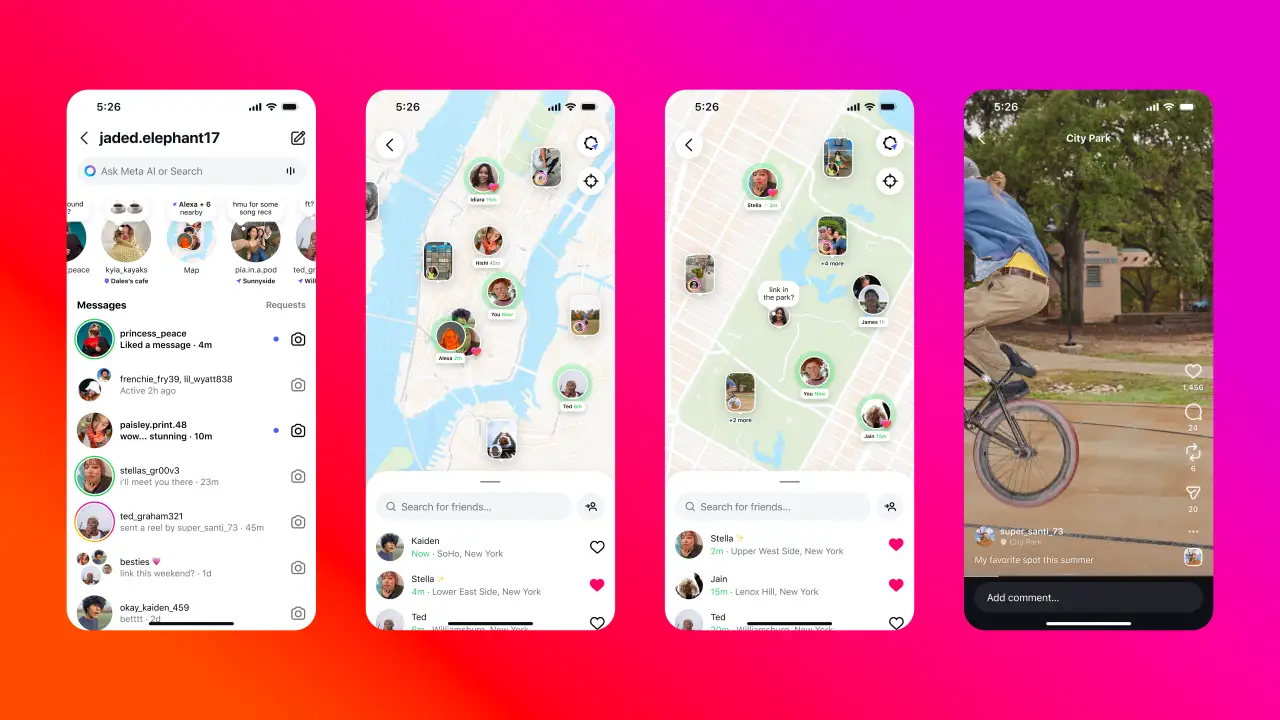
Instagram has launched Instagram Map, a new feature that lets U.S. users share their most recent active location with select friends and explore nearby Stories, Reels, and Notes. Think of it as Snap Map—but with stronger privacy safeguards built in.
What Makes Instagram Map Different?
Unlike Snapchat, Instagram Map updates your location only when the app is open or running in the background—never continuously. It gives you control while still allowing you to discover local content from creators and friends.
Privacy First: Opt-In Only
Location sharing is off by default. Instagram explicitly points this out during setup, and CEO Adam Mosseri has assured users that it’s entirely optional.
If you do turn it on, you’ll choose who sees your location—Friends you follow back, your Close Friends list, a carefully curated group, or no one at all.
And for accounts supervised by parents, Instagram sends notifications if a teen enables location sharing—helping keep parents in the loop.
Easy Access & Control: Quick Setup Guide
- Open Instagram and go to DMs—tap the new Map icon at the top.
- First time? A pop-up explains that your location won’t be visible unless you enable it.
- Upon entering, you’ll be prompted with a “Who can see your location?” screen.
- To change settings later, go to your profile → Settings → Story, Live & Location → Location Sharing.
Exploring Instagram Map: What You Can See
- Friends who share their location appear on the map with their tagged location.
- Location-based Stories and Reels from people you follow appear on the map for 24 hours after posting.
- Notes, short messages linked to specific spots, now appear on the map too—adding an ephemeral layer of interaction.
Even if your own location is off, you can still explore these posts and discover what’s happening around you.
Privacy Concerns: Real Risks to Consider
Despite privacy settings, community reactions—especially from women—have been vocal. Many worry Instagram Map could enable stalking or unwanted tracking. One user on Threads put it bluntly:
“Meta heard: ‘women feel unsafe online.’ And responded with: let’s add a map to DMs.”
The feature’s visibility of past location tag data adds fuel to these concerns—just because you tagged your story yesterday doesn’t mean you’re sharing your current spot.
Your Instagram Map Toolkit
| Action | What to Do |
|---|---|
| Enable Map | Tap the Map icon in DMs and follow prompts to select your audience—Friends, Close Friends, or Customize |
| Change privacy | Go to profile → Settings → Story, Live & Location → Location Sharing |
| Turn off sharing | Select “No one” or disable location in device settings to ensure you’re hidden |
| Use map safely | Explore local content, but avoid oversharing your location—especially in Stories or Reels |
Final Thoughts
Instagram Map opens new creative and social doors—but comes with power that must be handled carefully. Privacy controls help, but your choices matter most. Be intentional: share with whom you trust and think twice before tagging your exact spot.
About the Author
Anish is the founder of TechBoltX, sharing mobile gaming rewards, guides, and daily updates.