
ByAnish
How to Add Friends in Minecraft (2026 Easy Guide)
How to Add Friends in Minecraft Java Edition (2026 Easy Guide)
Big Minecraft multiplayer news is here.
For years, Minecraft Java Edition players had a harder time playing with friends.
Bedrock users already had easy friend invites.
Java players needed:
- LAN connection
- private servers
- Realms subscription
- third-party mods
That is finally changing.
Mojang Studios has added a built-in Friends List feature for Java Edition.
Now adding friends is much easier.
This guide shows exactly how.
Can You Add Friends in Minecraft Java Edition Now?
Yes.
Minecraft Java Edition now supports a Friends List system.
This works similarly to Bedrock multiplayer.
You can:
- send friend requests
- accept invites
- invite friends directly
- play together without a separate server
Important:
This feature currently works only in:
Minecraft 26.2 Snapshot 7 and newer
If you use an older version, it will not appear.
How to Add Friends in Minecraft
Follow these steps.
Install the Latest Snapshot
First, update Minecraft Java Edition.
Required version:
Minecraft 26.2 Snapshot 7 or newer
Without this update, the Friends feature is unavailable.
Open the Friends Menu
Launch Minecraft.
On the main screen:
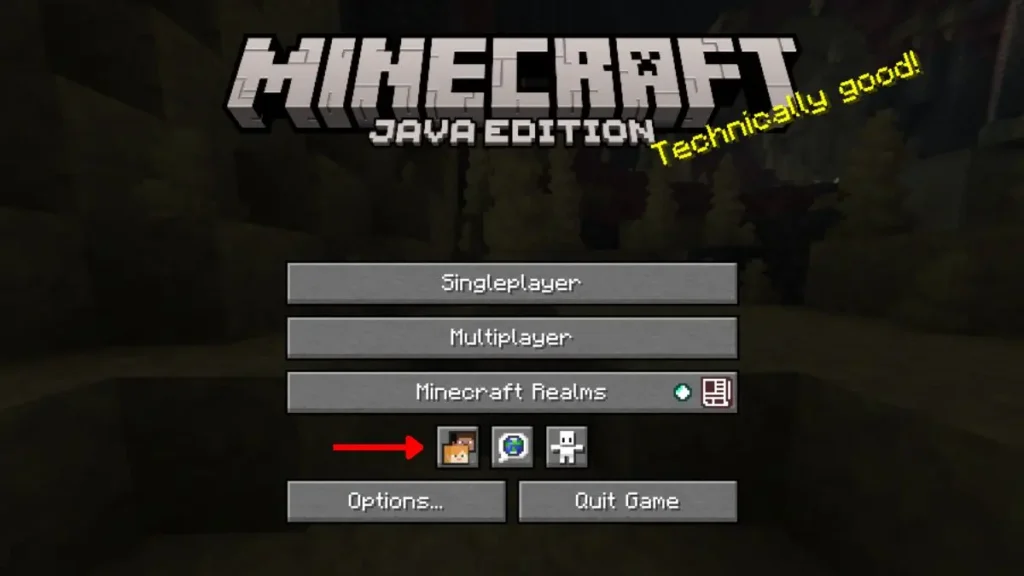
Look below Minecraft Realms.
You will see new icons.
Click the Friends icon.
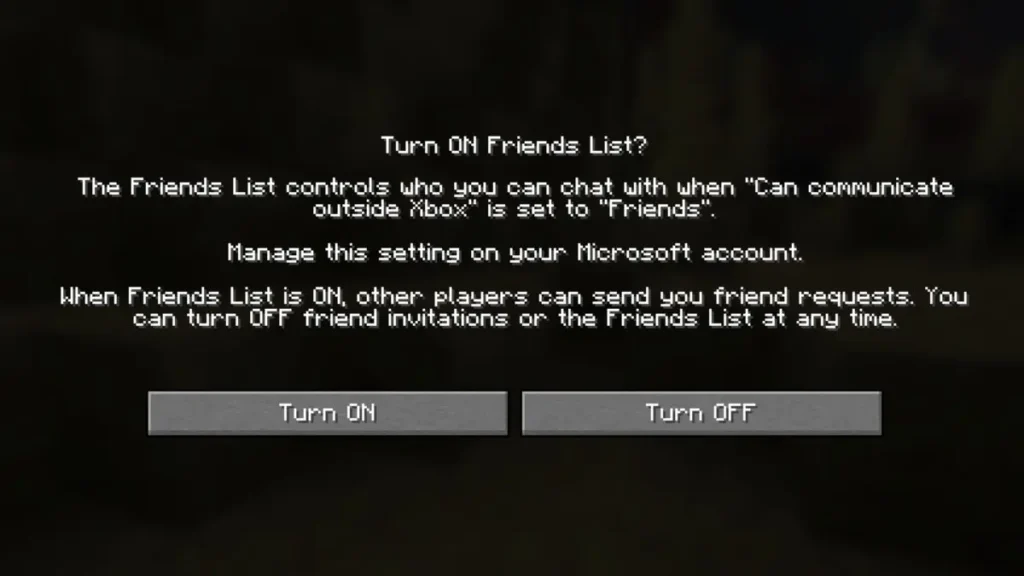
Enable Friends List Feature
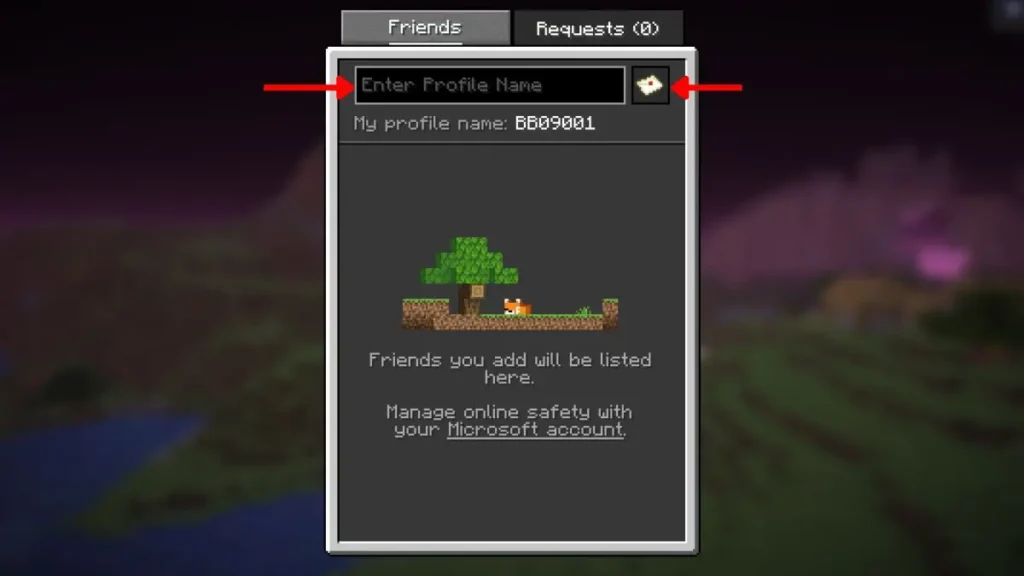
The first time you open it, Minecraft asks permission.
Turn ON:
- Friends List
- Allow Requests
Without these settings, requests will fail.
Send a Friend Request
Inside the Friends window:
- Type your friend’s Minecraft profile name
- Click the envelope icon
- Send request
Your friend will receive it instantly.
Accept Friend Requests
To accept incoming requests:
- Open Friends tab
- Go to Requests section
- Click accept
Once approved, the friend appears in your list.
How to Play Minecraft with Friends Without a Server
This is the best new feature.
Java players can now host worlds directly.
No separate server needed.
Open Your Single-Player World
Start your saved Minecraft world.
Pause the game.
Click:
Multiplayer
Turn Online Multiplayer On
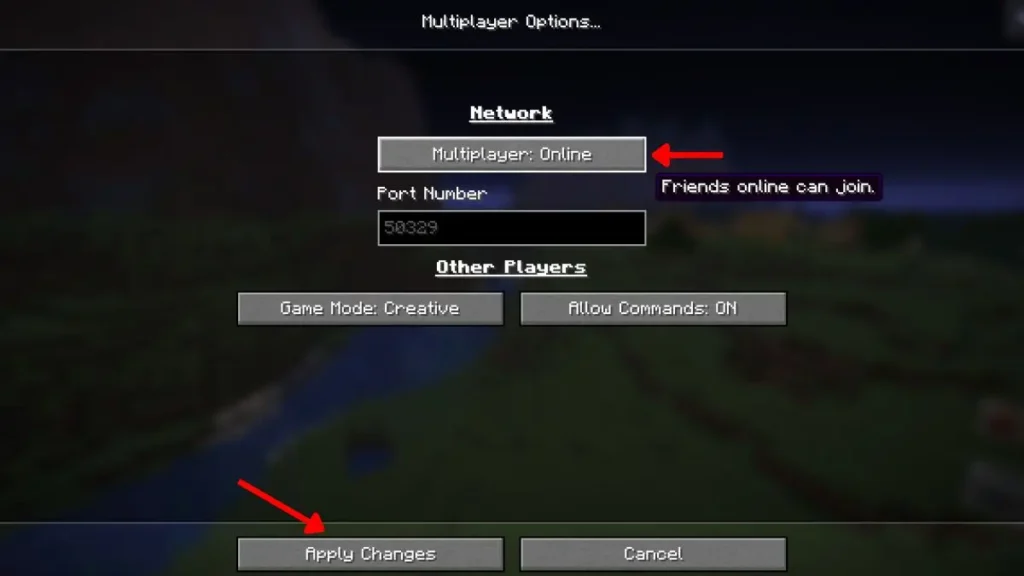
Inside multiplayer settings:
Enable:
Multiplayer: Online
Then click:
Apply Changes
Now your world becomes joinable.
Invite Friends to Your Minecraft World
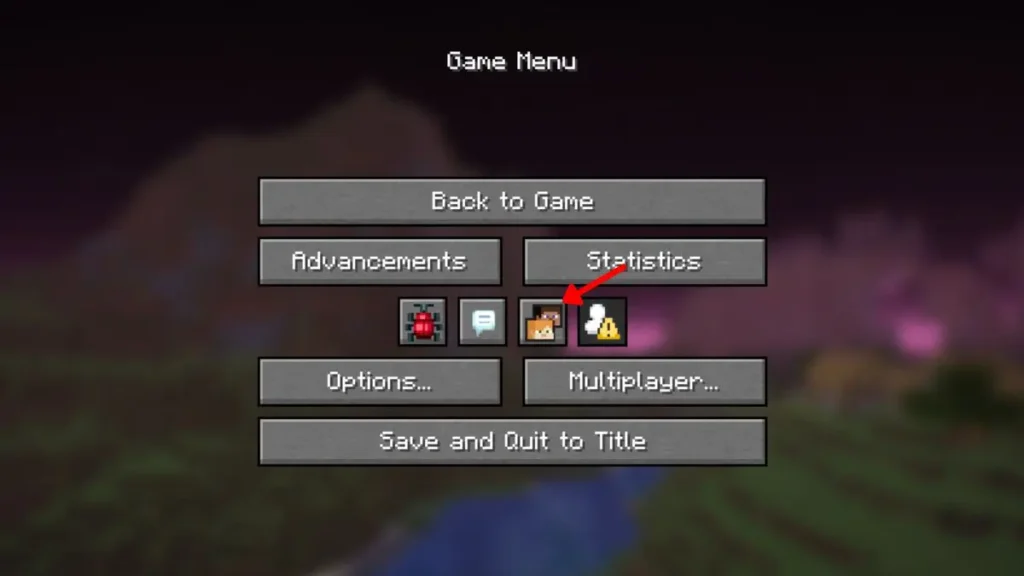
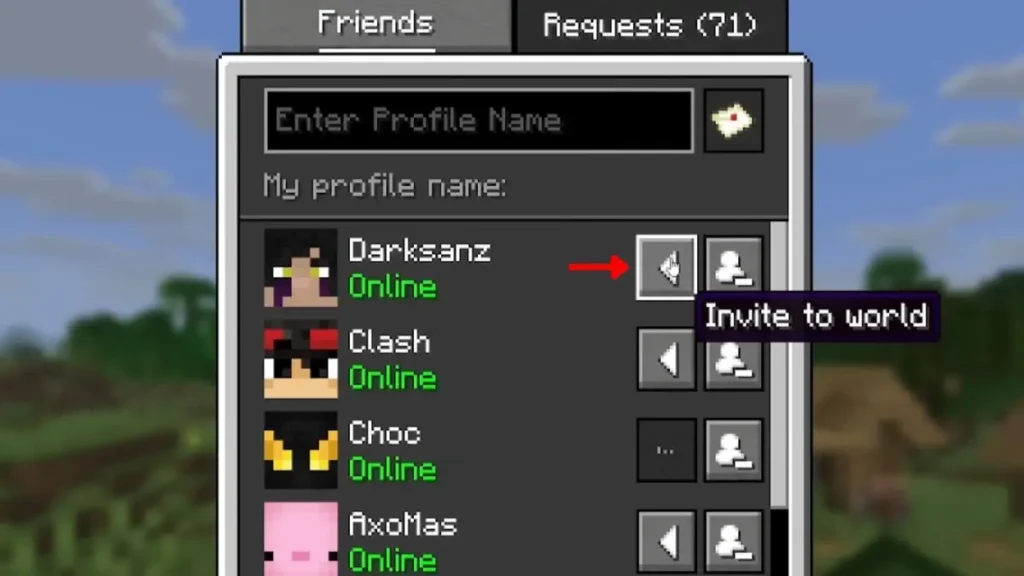
After enabling multiplayer:
- Press O
- Or open Pause Menu
- Click Friends icon
You will see online friends.
Next to their name:
Click the invite arrow.
Your friend receives an invite.
Once accepted, they join instantly.
Why Friend Requests May Not Work
If Minecraft friend requests fail, common reasons include:
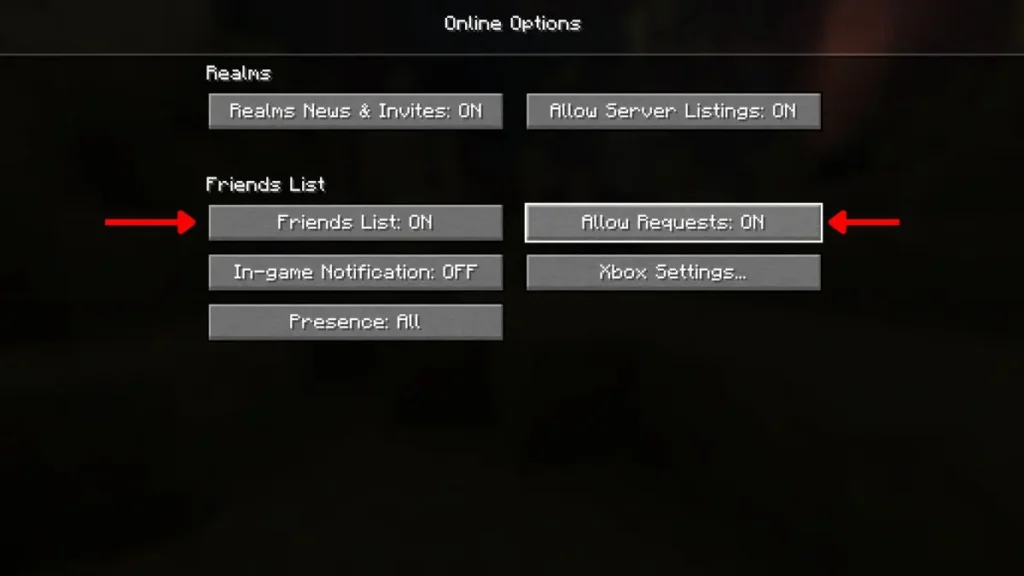
Friends List Disabled
Check settings.
Go to:
Options → Online Settings
Enable:
- Friends List
- Allow Requests
Old Minecraft Version
This feature only works in:
Minecraft 26.2 Snapshot 7+
Older builds will not support it.
Wrong Username
Minecraft usernames must match exactly.
Check spelling.
Friend Has Requests Disabled
If your friend turned off requests, invitations will fail.
Snapshot Bugs
This is still an early feature.
Some bugs may happen.
Future updates should improve stability.
Minecraft Java vs Bedrock Friends System
Quick comparison:
| Feature | Java Edition | Bedrock Edition |
|---|---|---|
| Friends List | Yes (new) | Yes |
| Direct Invites | Yes | Yes |
| Server Needed | No | No |
| Snapshot Required | Yes | No |
Java finally catches up.
Why This Update Is Huge
This changes Minecraft multiplayer completely.
Before:
Java multiplayer felt complicated.
Now:
Playing with friends feels much easier.
Good for:
- survival worlds
- co-op building
- adventure maps
- casual play sessions
This is one of Java’s best multiplayer upgrades in years.
Best Tips for Smooth Multiplayer
For fewer issues:
- use stable internet
- update Minecraft
- keep requests enabled
- use exact usernames
- restart game if invites fail
Final Thoughts
Minecraft Java multiplayer just became much easier.
No more complicated setup.
No private server stress.
No LAN-only limits.
If you wanted easier co-op play, this update is huge.
FAQ
Can you add friends in Minecraft Java Edition now?
Yes. Minecraft Java now supports a built-in Friends List feature in newer snapshots.
Why are friend requests not working in Minecraft?
Usually because the Friends List is disabled, the version is outdated, or requests are turned off.
Do you need Minecraft Realms to play with friends?
No. The new peer-to-peer multiplayer system removes that need for many players.
Can I play Minecraft Java with friends without a server?
Yes. You can now invite friends directly from your world.
About the Author
Anish is the founder of TechBoltX, sharing mobile gaming rewards, guides, and daily updates.