

ByAnish
Universal Tower Defense Private Servers List (December 2025)
Last Updated: December 18, 2025
Universal Tower Defense (UTD) is one of the newest Roblox tower defense games and is already gaining massive popularity. Like many modern Roblox titles, it supports private servers, allowing players to enjoy the game with friends without public-server interruptions.
In this guide, you’ll find:
- How to create a private server in Universal Tower Defense
- How to invite friends
- A list of active UTD private server links
🏰 What Is a Private Server in Universal Tower Defense?
A private server lets you:
- Play only with friends
- Farm gems without interference
- Summon units peacefully
- Claim relics and achievements
- Test builds and strategies
- Redeem codes normally
Best of all, UTD private servers are free.
🔒 How to Create a Private Server in Universal Tower Defense
Follow these simple steps:
- Open the Universal Tower Defense game page on Roblox.
- Scroll down and click the Servers tab.
- On the right side, select Create Private Server.
- Click Buy Now.
✅ The private server is free, so no Robux is required.
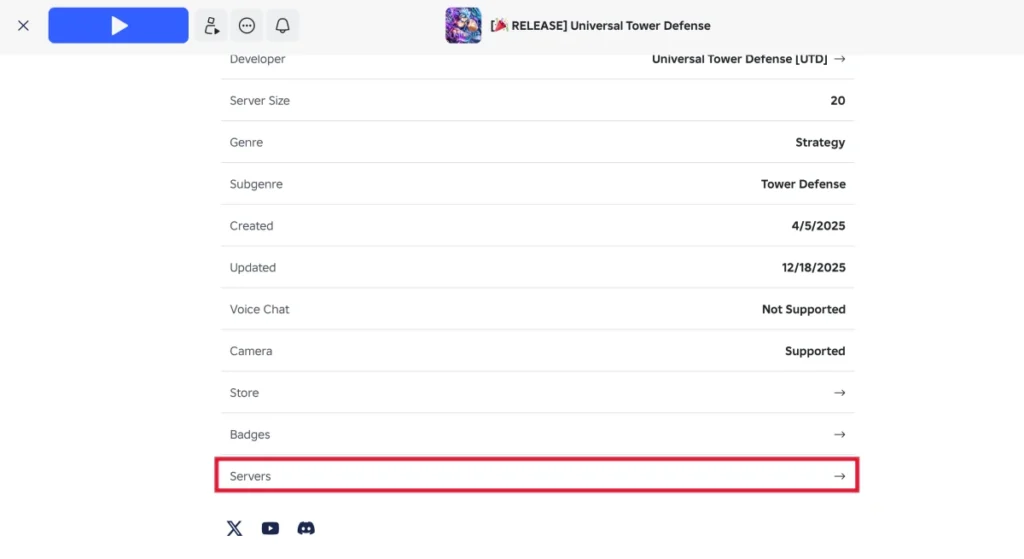
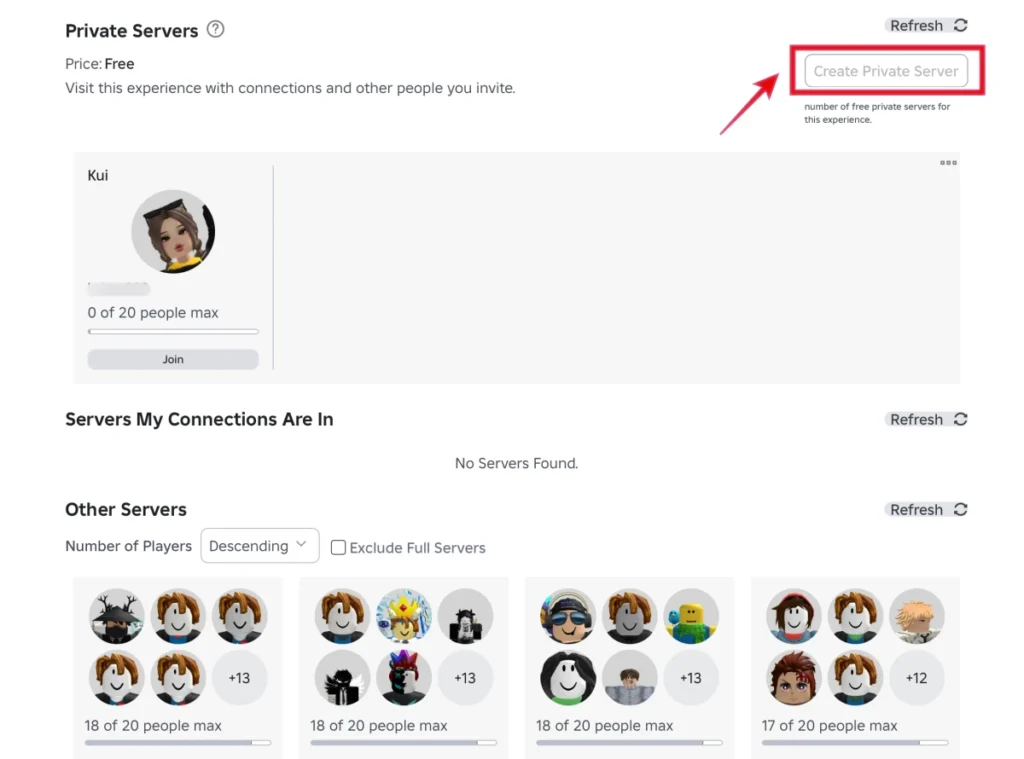
Once completed, your private server will be live instantly.
👥 How to Invite Friends to Your UTD Private Server
After creating your server, invite friends using the steps below:
- Go back to the Servers tab.
- Locate your private server.
- Click the three-dot (⋮) menu next to it.
- Select Configure.
- Make sure Allow Joining is enabled.
- Scroll down and generate the private server link.
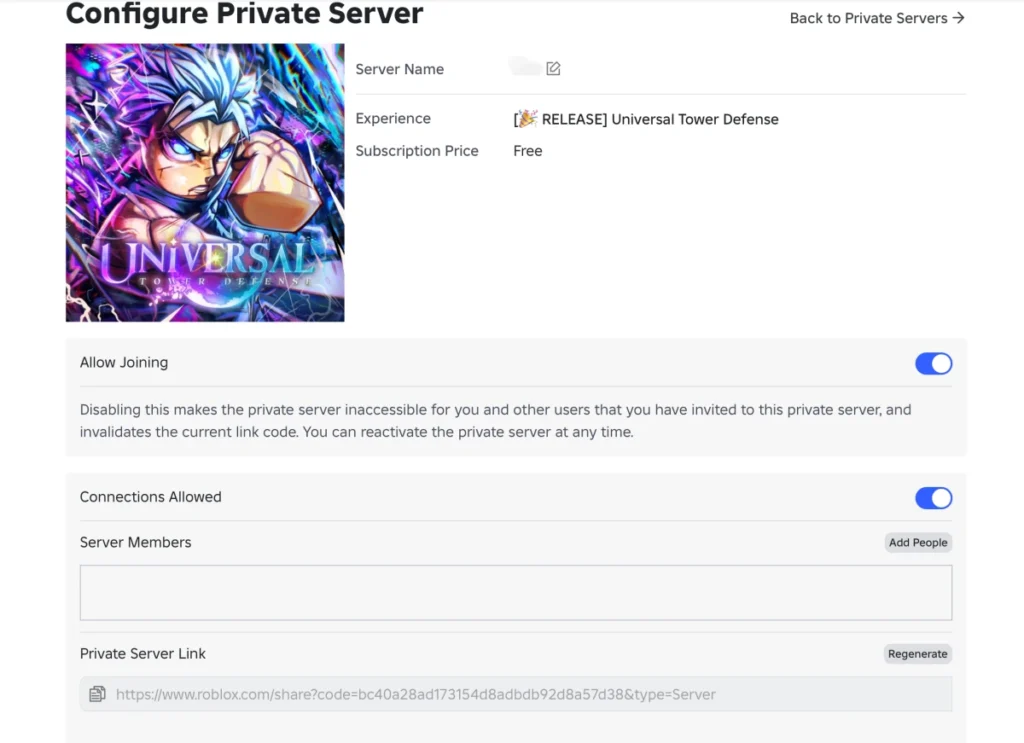
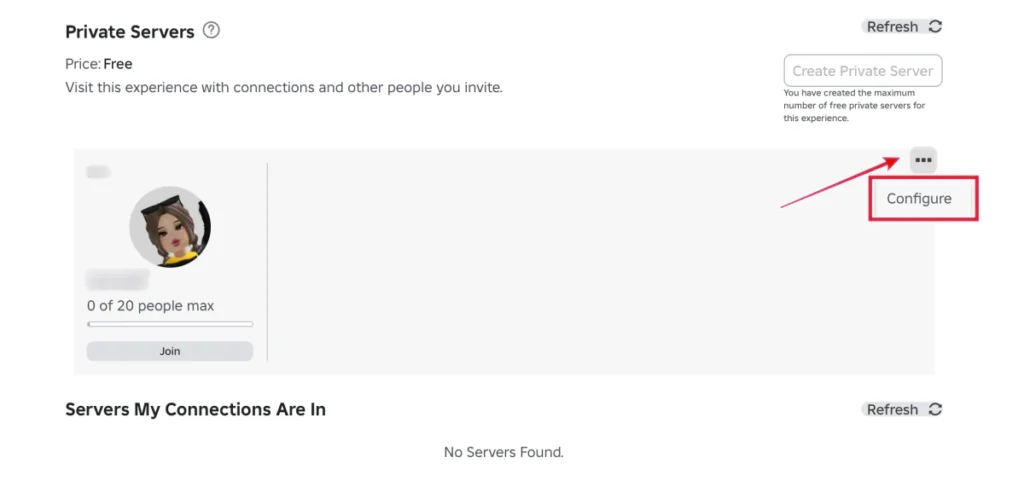
Server Access Options
- 🌐 Public: Anyone with the link can join
- 🔐 Private: Use Add People to invite specific Roblox friends
📌 Player limit: Up to 20 players can join a Universal Tower Defense private server.
🔗 All Active Universal Tower Defense Private Server Links
Below is a currently active UTD private server link.
⚠️ Private servers may close or reset without notice. This list is updated regularly.
Note: For transparency and safety, links are shared in plain text only and lead directly to Roblox.
https://www.roblox.com/share?code=bc40a28ad173154d8adbdb92d8a57d38&type=Server
If the server is full or unavailable, check back later for new links.
📘 More Universal Tower Defense Guides
Looking for more help?
- Units & tier lists
- Codes & rewards
- Beginner & advanced strategies
👉 Visit our Universal Tower Defense Wiki on TechBoltX for complete coverage.
✅ Final Thoughts
Universal Tower Defense private servers are free, easy to create, and perfect for grinding. If you want a smooth experience without public server chaos, private servers are the best way to play.
Bookmark this page — we update it frequently with new working UTD private server links.
❓ FAQs
Are Universal Tower Defense private servers free?
Yes. Creating a private server in UTD is completely free.
How many players can join a UTD private server?
Up to 20 players can join a private server.
Can I redeem codes in a private server?
Yes. All redeem codes work normally in private servers.
Are these Universal Tower Defense private server links safe?
Yes. All links lead directly to the official Roblox website.
Do private servers affect gameplay or rewards?
No. Gameplay, rewards, and progression are the same as public servers.
About the Author
Anish is the founder of TechBoltX and tracks Coin Master free spin links daily. He shares verified reward links faster than others.