

ByAnish
Switching from ChatGPT to Claude? Full Guide
Switching from ChatGPT to Claude? Full Guide
By TechBoltX Team | March 3, 2026
A lot of users are moving from ChatGPT to Claude.
The shift started after controversy around government AI deals. Anthropic, the company behind Claude, reportedly refused to allow its AI models to be used for mass domestic surveillance or fully autonomous weapons.
Soon after, President Trump ordered federal agencies to stop using Anthropic’s tools. Defense officials also labeled the company a potential supply-chain risk.
Hours later, OpenAI announced a Pentagon partnership with stated safeguards. That move sparked heavy debate online about AI ethics and privacy.
Since then, Claude has surged past ChatGPT in Apple’s U.S. App Store rankings. Anthropic says daily sign-ups are at record highs. Free users are up more than 60% since January. Paid plans have more than doubled.
If you’re thinking about making the switch, here’s how to do it the right way.
Step 1: Export Your Data from ChatGPT
You don’t have to lose your AI history.
ChatGPT stores memories, preferences, and conversations. You can move that context to Claude.
Option A: Copy Your Memory Settings
- Open ChatGPT.
- Go to Settings.
- Click Personalization.
- Open Memory.
- Review what’s saved.
- Copy the info you want to keep.
Clean it up before moving it over.
Option B: Export Full Chat History
If you want everything:
- Go to Settings.
- Select Data Controls.
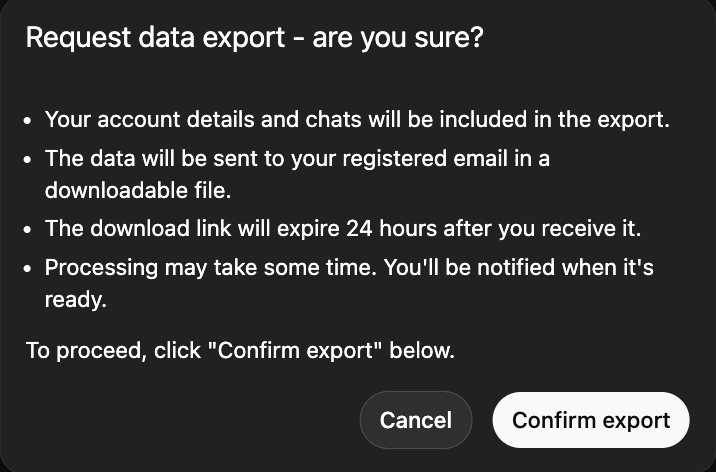
- Click Export Data.
You’ll receive an email with text or JSON files of your chats.
Note: If you have years of history, this can take time.
Option C: Manual Summary
You can also ask ChatGPT:
“Summarize my main preferences, topics, and writing style.”
Copy that summary.
This method is fast and easy.
Step 2: Import Your Data into Claude
Claude makes importing simple.
- Open Claude.
- Go to Settings.
- Select Capabilities.
- Make sure Memory is turned on.
Then start a new chat and paste this:
“Here’s important context about me. Please update your memory with this.”
Paste your copied data.
If you exported raw files, don’t paste everything directly. Instead say:
“Review this and summarize my key preferences.”
Claude will organize it cleanly.
After that, confirm by asking:
“What do you remember about me?”
Double-check accuracy.
Step 3: Delete Your ChatGPT Account (If You Want a Clean Break)
Canceling a subscription is not enough.
To fully remove your data:
- Go to Settings → Personalization → Memory.
- Delete stored memory.
- Type in chat: “Delete all my memory and personalized data.”
- Go to account settings.
- Delete your account.
This ensures your stored personalization is cleared.
Why Are Users Switching?
The switch is not just about features.
It’s about trust.
Some users feel more comfortable with Anthropic’s stance on military AI use. Others prefer Claude’s writing tone or long-form reasoning.
At the same time, OpenAI says its Pentagon deal includes strict safeguards.
This is now part of a bigger AI ethics debate:
- Should AI companies work with defense agencies?
- Where should limits exist?
- Who controls AI infrastructure?
Users are voting with downloads.
Claude vs ChatGPT: What’s Different?
Here’s a quick comparison:
Claude
- Strong long-form reasoning
- Clear writing tone
- Growing user base
- Memory available to free users
ChatGPT
- Deep plugin ecosystem
- Large developer tools
- Fast response times
- Strong coding support
Both are powerful. The choice depends on your priorities.
Final Thoughts
Switching from ChatGPT to Claude is simple if you follow the steps above.
Export your data.
Import it properly.
Delete your account if needed.
AI tools are becoming daily work partners. Choosing the right one matters.
Right now, Claude is gaining momentum fast. Whether that trend continues will depend on trust, performance, and how these companies handle ethical pressure in the months ahead.
Stay with TechBoltX for AI updates, comparisons, and privacy-focused guides.
About the Author
Anish is the founder of TechBoltX and tracks Coin Master free spin links daily. He shares verified reward links faster than others.