
ByAnish
How to Link Pokémon Champions to Pokémon HOME (2026 Guide)
Pokémon Champions is a free-to-play game that lets you recruit powerful Pokémon and build competitive teams. One of the best ways to expand your roster is by transferring Pokémon from Pokémon HOME.
This guide explains exactly how to link Pokémon Champions to Pokémon HOME, collect Pokémon, send them back, and all important restrictions and stat rules.
How to Connect Pokémon Champions to Pokémon HOME
You need the same Nintendo Account logged in on both Pokémon Champions and Pokémon HOME. The process differs slightly between Nintendo Switch and Mobile.
On Nintendo Switch (Pokémon HOME App)
- Open the Pokémon HOME app on your Nintendo Switch.
- On the opening screen, select the Pokémon Champions option.
- Verify the Nintendo Account name you want to connect.
- Click Yes to link Pokémon Champions with Pokémon HOME.
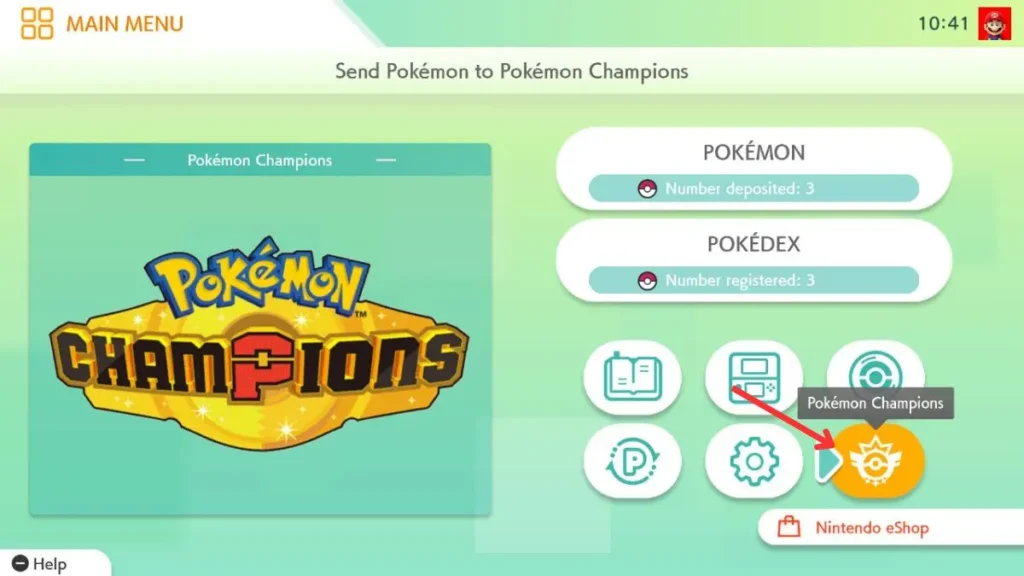
Tip: While linking, redeem the latest active Pokémon Champions mystery gift code to claim a free Pokémon.
On Pokémon HOME Mobile App
Mobile users can manage transfers through the Pokémon HOME mobile app (Pokémon Champions mobile version is not yet released as of April 2026).
- Open the Pokémon HOME mobile app.
- Tap the Menu icon.
- Go to Options.
- Under Link with Pokémon Champions, select Send for a Visit.
- Log in with the same Nintendo Account used on your Switch console.
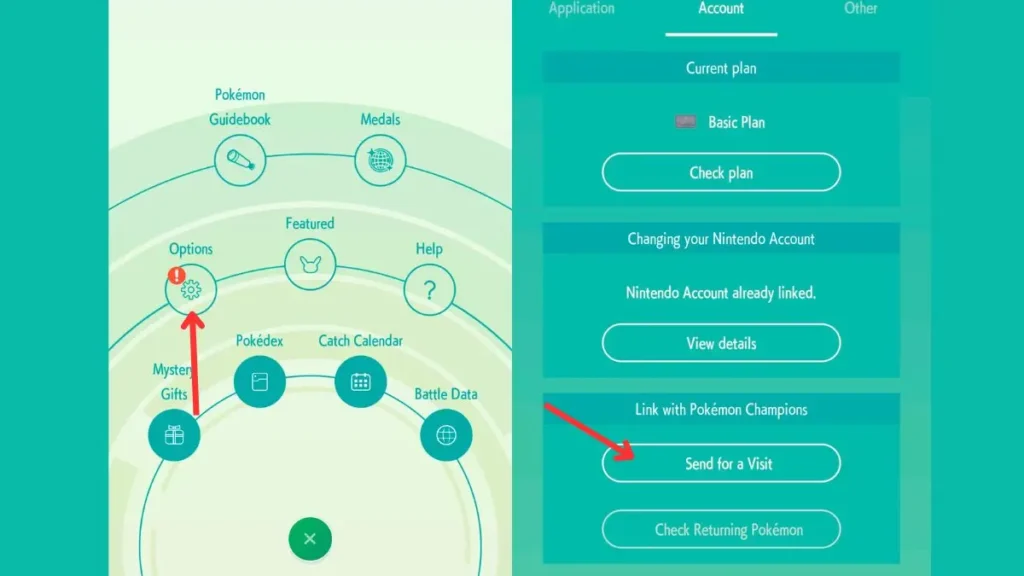
Once linked successfully, you can freely move eligible Pokémon between the two services.
Pokémon Transfer Restrictions (Important!)
Before transferring, review these key limitations:
| Restriction Type | Details |
|---|---|
| Pokémon HOME Restrictions | Once sent to Champions, you cannot: Trade it (GTS, Wonder Box, Room/Friend Trade), Release it, Mark as Favorite, Assign labels, or Send it to other games. |
| Eligible Pokémon | Only Pokémon that appear in Pokémon Champions can be transferred. |
| One-Way Limit | Pokémon obtained in Champions cannot be sent back to HOME. |
| Strength/Stats | Current strength in HOME is used in Champions. Training done in Champions does not carry over to HOME. |
| Return Rule | Stats/training are retained in Champions only once when returning. |
| Battle Teams | Any Pokémon registered in Champions Battle Teams will be removed when sent back to HOME. |
How to Collect Pokémon from Pokémon HOME in Champions
After linking:
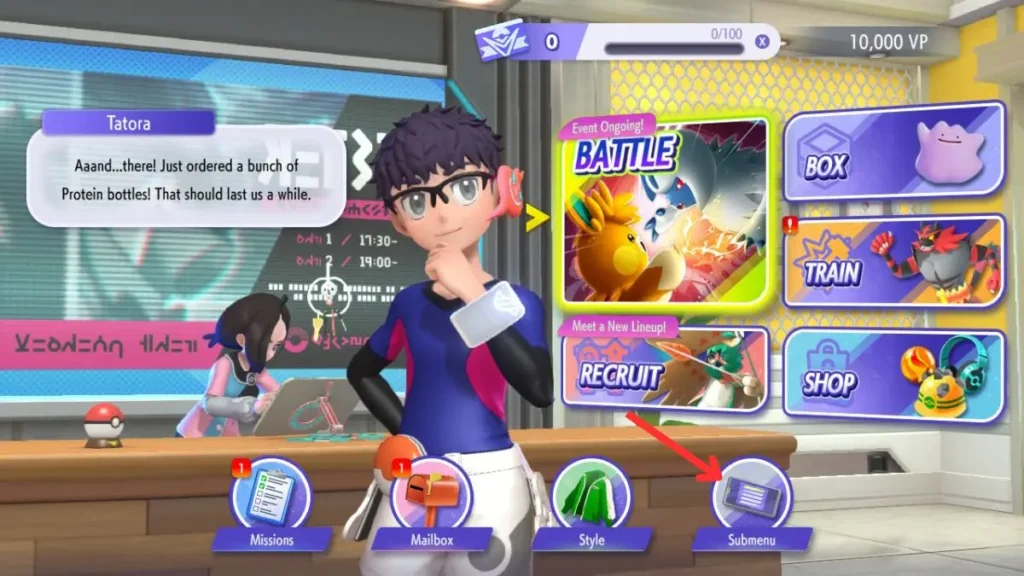
- From the Main Menu in Pokémon Champions, tap Recruit.
- Select Collect from Pokémon HOME.
- Choose the Pokémon you want to transfer.
- Tap Collect and confirm Yes after reading the conditions.
Recommended Pokémon to Transfer: Strong legendaries like Mewtwo (from Pokémon GO → HOME) are excellent additions to your Champions team.
How to Send Back Pokémon from Champions to HOME
- From the Main Menu in Pokémon Champions, tap Recruit.
- Select Send Back to Pokémon HOME.
- Choose the Pokémon you wish to return.
- Press X on your console and confirm Yes.
Note: You can only send back Pokémon that were originally transferred from HOME. Pokémon caught or obtained directly in Champions cannot be sent back.
Does the Stat Remain the Same After Moving Pokémon?
- When moving from HOME to Champions: The Pokémon uses its current strength/stats from HOME.
- Training or changes made in Champions do not transfer back to HOME.
- If you send the Pokémon back to HOME and then bring it to Champions again, its previous training/stats in Champions are retained only once.
FAQ – Linking Pokémon Champions to Pokémon HOME
Q1: How to connect Pokémon Champions to Pokémon HOME? A: Use the same Nintendo Account on both apps. On Switch, select Pokémon Champions from the HOME opening screen and confirm the link. On mobile, go to Menu → Options → Link with Pokémon Champions → Send for a Visit.
Q2: Can you send back Pokémon from Champions to HOME? A: Yes, but only Pokémon that were originally transferred from HOME. Pokémon obtained in Champions cannot be sent back to HOME.
Q3: Does the stat remain the same after moving Pokémon from Champions to HOME? A: Stats/training done in Champions do not carry over to HOME. However, when you bring the same Pokémon back to Champions later, its previous Champions stats/training are retained only once.
Q4: Can I trade a Pokémon after sending it to Pokémon Champions? A: No. Once sent to Champions, the Pokémon cannot be traded, released, or sent to other games from Pokémon HOME.
Q5: Which Pokémon can be transferred to Pokémon Champions? A: Only Pokémon that appear in the Champions roster. Legendaries and strong competitive Pokémon from Pokémon GO or other games work great.
Q6: Is Pokémon Champions available on Mobile? A: As of April 2026, Pokémon Champions on mobile is not yet released. Transfers are currently handled primarily through the Nintendo Switch version.
About the Author
Anish is the founder of TechBoltX, sharing mobile gaming rewards, guides, and daily updates.