
ByAnish
Empower AI Agents with Make’s No-Code MCP Server
Empower AI Agents With Make’s No-Code MCP Server
As AI automation evolves rapidly, we’re seeing a major shift from simple task-based bots to intelligent, tool-using AI agents. At the forefront of this shift is Make’s new Model Context Protocol (MCP) server — a no-code innovation that lets AI agents connect directly to your Make scenarios like tools in a toolbox. Whether you’re a developer or an automation enthusiast, this technology makes agentic workflows more accessible than ever.
In this post, we’ll break down what the MCP server is, how it works, and how to set it up — plus share practical examples to help you start building AI-powered automation today.
💡 What Is the Make MCP Server?
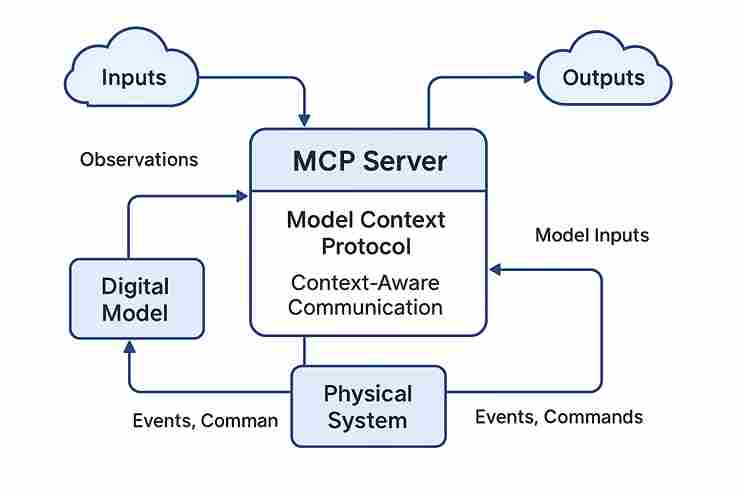
The MCP (Model Context Protocol) server is Make’s new way to give AI agents the ability to discover and use your automation scenarios without code. Instead of building and maintaining complex APIs, MCP lets you expose your Make scenarios to an AI agent like Claude or Cursor in real time — securely, and without infrastructure.
This means your AI can now trigger workflows, send or retrieve data, and even make decisions based on structured inputs and outputs — all from the cloud.
🔍 Related: Learn more about the AI tools transforming productivity in 2025 to understand how MCP fits into the broader landscape.
🛠️ How Does MCP Work?
MCP introduces a standardized way for AI to understand:
- What tools (scenarios) are available
- What each one does
- What inputs it requires
- What outputs it will return
This is critical for reducing AI hallucination, making decisions deterministic, and ensuring reliability — especially in professional automation systems. The best part? You don’t need to write or host any backend code.
🚀 Setting Up MCP in Make (Step-by-Step)
Here’s how to start using the Make MCP Server in just a few minutes:
- Create a Scenario in Make: Add modules, use AI if needed, and configure “Scenario Outputs” to define return data.
- Enable “On-Demand” Triggers: Your scenario must be activated and available for external calls.
- Get Your MCP Token: In your profile under “API & Webhooks,” generate an MCP Token and copy the URL.
- Paste Into AI Config: Add the URL to your AI agent (e.g., Claude or Cursor). It can now discover and trigger your Make scenarios.
You’re done — your AI now has a toolbox.
🧠 Explore: See which AI trends are shaping the future of automation in 2025, including tool-using agents and real-time integration.
🔄 Real-World Examples of MCP Use
With your MCP server live, here’s what becomes possible:
- Claude AI can run a Make scenario to fetch sales leads and analyze data
- Cursor can execute a follow-up email flow on command
- Your chatbot can pull live data from a Google Sheet scenario
- Your AI assistant can check team capacity from Make Data Store before assigning tasks
These workflows are secure, fast, and cloud-native — requiring no Docker or Node setup.
🌐 Related Read: Discover which AI tools are revolutionizing workflows in 2025 and how MCP supercharges them.
🧩 Why MCP Changes the Game
Before MCP, agents could only simulate tool use. Now, they can actually use tools. Think of it as giving your AI hands to reach into your digital toolkit — executing real tasks across your connected apps.
It’s not just a tech demo — it’s real-world automation at scale, made possible with zero-code.
📝 Final Thoughts
If you’re building smart assistants, automating workflows, or simply curious about the next frontier in no-code AI, the Make MCP server is a game changer. It connects the intelligence of large language models with the precision of structured workflows — securely, instantly, and effortlessly.
Now is the time to power up your AI — and give it tools it can trust.
About the Author
Anish is the founder of TechBoltX, sharing mobile gaming rewards, guides, and daily updates.