
ByAnish
Is Roblox Server Down? How to Check Status and Fix Issues
By Anish Khan Published: February 15, 2026.
Can’t log into Roblox? Seeing error codes like 277, 502 Bad Gateway, or connection issues? You’re not alone—millions face these glitches daily. But is Roblox down right now, or is it your setup? As of February 15, 2026, at 10:46 AM IST (about 5:16 AM UTC), Roblox servers are fully operational with no active outages. There was a brief service disruption on February 14, 2026, around 2:46 AM UTC, lasting about 1 hour, affecting game joins and messaging. It’s resolved now, but if you’re still stuck, we’ll guide you through checks and fixes.
Is Roblox Server Down Right Now?
No, Roblox is up and running smoothly as of February 15, 2026. Official status shows all systems operational—no issues with authentication, game joins, messaging, or other components. Downdetector reports no spikes in user complaints over the last 24 hours. If you’re experiencing problems, it might be local (e.g., your internet, device, or VPN).
Yesterday’s outage (Feb 14) impacted popular games like Steal a Brainrot, Escape Tsunami for Brainrots, The Forge, and My Fishing Brainrots due to high traffic from updates. Players saw HTTP errors, infinite loading, or “close client and try again” messages. Roblox confirmed and fixed it quickly—downtime rarely exceeds 15-60 minutes.

When Do Roblox Servers Go Down?
Roblox outages often hit during peak times or updates:
- Weekly Updates: Popular experiences update on weekends (Saturdays/Sundays), overwhelming servers.
- High Traffic: Games with millions online (e.g., Steal a Brainrot’s 58B+ visits) can cause crashes when players flood in.
- Maintenance: Scheduled downtimes are announced on status.roblox.com or X.
- Unexpected Issues: Like the Feb 14 partial disruption affecting website, apps, games, and joins.
Outages are temporary—Roblox’s team resolves them fast. Not shutting down forever!
How to Check Roblox Server Status
Stay updated with these reliable sources—we’ll refresh this guide for any new issues:
- Roblox Official Status Website: Real-time component status (e.g., Games, Studio, Asset Delivery).
- Downdetector: User reports, outage maps, and problem breakdowns (e.g., 43% server connection).
- Roblox on X (@Roblox): Official announcements.
- Community Trackers: @RblxTracker or @RobloxUptime for analytics and alerts.
- IsItDownRightNow or DownForEveryoneOrJustMe: Quick ping checks.
If servers are green but you’re down, try fixes below.
How to Fix Roblox Connection Issues
If it’s not a server outage:
- Restart Roblox/Client: Close and reopen the app.
- Check Internet: Reboot router, switch WiFi, or use mobile data. Test speed at speedtest.net.
- Disable VPN/Firewall: They can block Roblox ports.
- Update Roblox/App: Ensure latest version.
- Clear Cache: In settings, clear temporary files.
- Reinstall Roblox: Uninstall and redownload from roblox.com.
- Error-Specific Fixes:
- Error 277 (Lost Connection): Update drivers, flush DNS (cmd: ipconfig /flushdns).
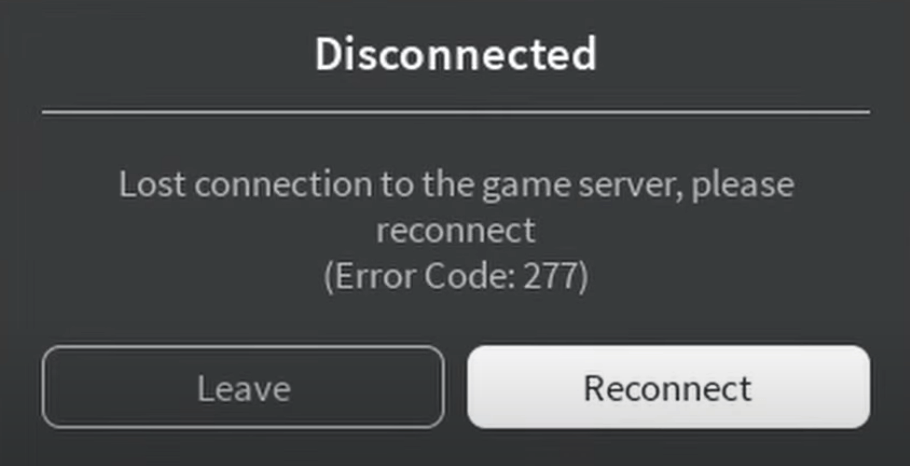
- 502 Bad Gateway: Server-side, wait or retry.
- Infinite Loading: Check antivirus blocking.
For mobile/Xbox/PC, issues are similar—always verify status first.
Common Roblox Error Codes and Meanings
| Error Code | Meaning | Quick Fix |
|---|---|---|
| 277 | Lost server connection | Restart router, update app |
| 502 | Bad Gateway (server overload) | Wait 5-10 mins, retry |
| 275 | Maintenance shutdown | Check status, try later |
| 9007 | Login failure | Clear cache, relogin |
Roblox Tips During Outages
- Join Discord communities for real-time chats.
- Play offline alternatives or wait—downtime boosts future updates!
- Bookmark this page for instant updates.
No active codes for boosts during outages but check Roblox events post-fix.
About the Author
Anish covers Roblox guides, events, and tips. He helps players find secrets, updates, and gameplay tricks.