 ByAnish

How Google’s NotebookLM Made Me 80% Faster at Learning
How Google’s NotebookLM Made Me 80% Faster at Learning
I’ve said it before, and I’ll say it again: the number one skill anyone can master is learning how to learn.
Think about it. We spend years in school and college cramming information we often forget because much of it is never applied in real life. The real challenge isn’t learning more — it’s learning what and how to learn effectively.
I’ve always loved reading and learning, but my biggest flaw was trying to absorb everything at once. I didn’t know how to prioritize important information, and I often ended up confused and mentally exhausted.
Then Google dropped a game-changer: NotebookLM. This tool has completely transformed the way I learn. It’s like having a personalized tutor and researcher rolled into one.
Adding Your Knowledge Base: The Multimodal Advantage
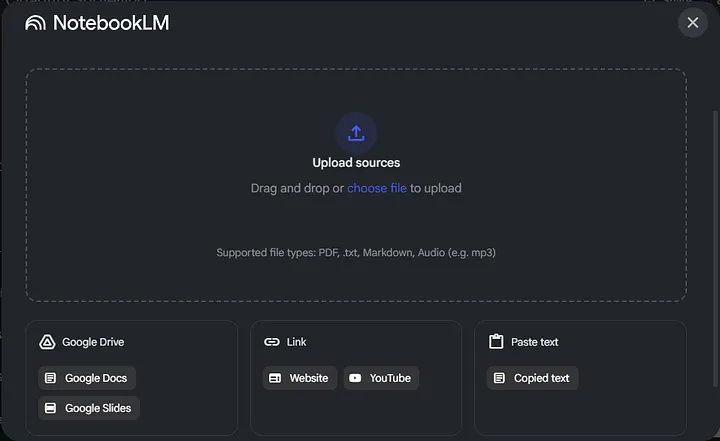
Whenever you start learning a new topic, you face an overwhelming flood of sources: PDFs, books, articles, and YouTube videos. NotebookLM solves this by letting you add up to 50 sources per notebook, including PDFs, Google Docs, Slides, Markdown files, URLs, and even audio or video files.
Once added, NotebookLM instantly generates summaries for a quick understanding — no more endless skimming or repetitive reading.
Briefing Docs: Intelligent Knowledge Synthesis
The Briefing Docs feature compiles all your materials into a concise, original summary. It avoids repetition and creates a new, structured document from all your sources. Imagine having a single, brilliant summary of everything you need to know — that’s the power of NotebookLM.
Structured Learning with Study Guides
If you prefer a clear study path, the Study Guide feature is perfect. It outlines a step-by-step learning journey, showing you what to learn first, next, and last — ideal for subjects like civil engineering, quantity surveying, or any topic that requires strong foundations.
Timeline & Mind Maps: Visualize Complex Topics
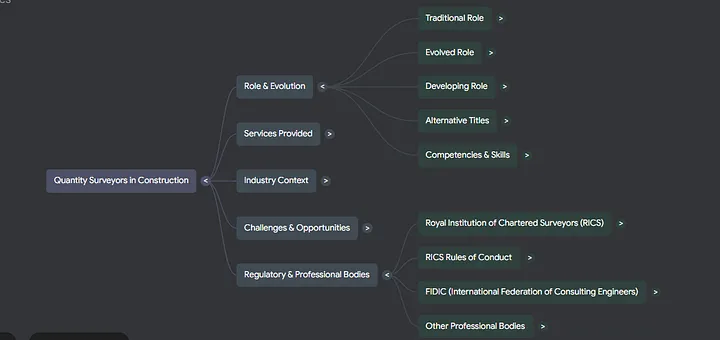
For history, social sciences, or any data-heavy topic, the Timeline feature is a dream. NotebookLM automatically arranges events, dates, and characters chronologically.
The Mind Map feature lets you visually connect ideas. You can quickly refresh your understanding of a topic in just a few minutes — perfect before exams or presentations.
Audio & Video Overviews: Learn Anywhere, Anytime
NotebookLM truly shines with its multimodal learning features:
- Audio Overviews: Like a personalized podcast tutor. You can ask questions and focus on specific details, making learning interactive even while commuting.
- Video Overviews: Narrated visual slide presentations explain complex concepts clearly — perfect for visual learners or teaching others.
Both are available in over 80 languages, making learning globally accessible.
Conclusion: Learn Smarter, Not Harder
NotebookLM isn’t about replacing your brain — it’s about learning smarter. By summarizing resources, generating study guides, creating mind maps, and offering interactive audio/video overviews, it helps you focus only on what matters.
If you’ve ever felt overwhelmed by information or struggled to study effectively, NotebookLM is your solution.
Keep learning. Keep exploring. Keep building.