
ByAnish
Figma Launches New AI-Powered Object Removal Tools (2025)
Figma Rolls Out AI Object Removal and Image Expansion Tools
Posted: 6:00 AM PST · December 10, 2025
Figma has officially launched its newest suite of AI-powered image editing tools, giving designers the power to remove objects, isolate subjects, expand images, and adjust visual elements—all without leaving the Figma workspace.
This update eliminates the friction of exporting images into Photoshop, Canva, or external AI models like Nano Banana for detailed edits.
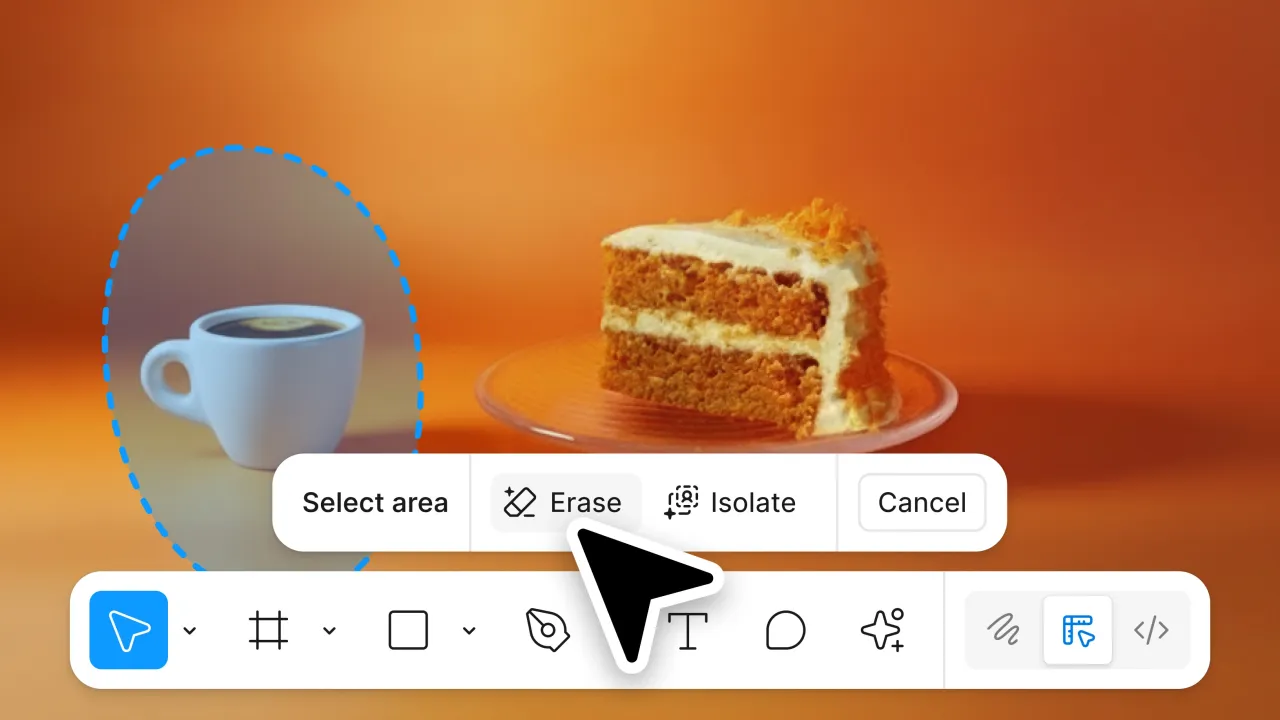
At the heart of this release is a major upgrade to Figma’s lasso selection tool, now capable of handling precise object detection, removal, lighting adjustment, and subject isolation.
The timing is interesting: Figma’s launch comes on the same day Adobe rolled out similar features inside ChatGPT, intensifying the AI design race.
What’s New in Figma’s AI Image Editing Update
1. AI Object Removal (No Prompts Needed)
Figma now allows users to:
- Select any object with the enhanced lasso tool
- Remove it instantly
- Auto-fill the background while keeping original colors and textures intact
This places Figma in direct competition with Canva and Adobe Photoshop, which have offered this for years.
2. Object Isolation & Adjustment
Once an object is selected, designers can:
- Move it around freely
- Modify lighting, shadows, color, and focus
- Preserve environmental consistency
This brings high-level photo manipulation directly into UI/UX workflows.

3. AI-Powered Image Expansion
Perfect for responsive creativity:
- Extend a square image into a banner
- Generate missing background areas
- Create landscape, portrait, or custom ratios
- No cropping needed
This solves a major pain point for ad creatives, mobile banners, and social media formats.
4. Unified Image Editing Toolbar
Figma now groups all editing tools into a single toolbar:
- Object selection
- Background removal
- Color and lighting adjustments
- Text & annotation insertion
Since background removal is one of Figma’s most-used actions, it now gets prime placement.
Availability
These new AI features are rolling out to:
- Figma Design
- Figma Draw
The company confirmed that more Figma tools will receive AI editing updates in 2026.
However, it remains unclear whether these advanced functions will be accessible inside Figma’s ChatGPT plugin, even though Figma partnered with OpenAI in October.
Why This Matters: Figma Catching Up with Adobe & Canva
While Adobe and Canva have been ahead in AI image editing, Figma’s strength lies in:
- Native integration
- Real-time multiplayer collaboration
- UI/UX design pipelines
By embedding AI editing directly into the design canvas, Figma minimizes workflow interruptions and keeps designers inside its ecosystem — a critical move as design tools fight for AI supremacy.
FAQs
1. What new AI features has Figma launched?
Figma introduced AI-powered object removal, object isolation, improved lasso selection, image expansion, and a unified editing toolbar.
2. Can Figma remove objects without a text prompt?
Yes. Unlike generative models, Figma’s new tools work without prompts, relying on lasso-based object selection.
3. Does Figma now support image expansion?
Yes, Figma can extend an image beyond its original canvas, generating new background details automatically.
4. Are these tools available inside the Figma plugin for ChatGPT?
Figma hasn’t confirmed whether these features will appear inside ChatGPT integrations.
5. How does this compare to Adobe and Canva?
Adobe and Canva offered object removal earlier, but Figma’s approach is optimized for UI/UX workflows and real-time collaboration.
About the Author
Anish is the founder of TechBoltX, sharing mobile gaming rewards, guides, and daily updates.