
ByAnish
Android 16 Tappable Location Indicator to Track App Access
Google has started rolling out Android 16 QPR3 Beta 1 to supported Pixel devices, and one of the most important additions is a major privacy upgrade: a tappable location indicator that clearly shows which apps are accessing your location in real time.
This long-awaited feature brings Android’s location privacy controls closer to the transparency users expect from modern mobile operating systems.
📍 What Is the New Location Indicator in Android 16?
In Android 16 QPR3, Google introduces a blue location indicator that appears in the status bar whenever an app accesses your device’s location.
Similar to the existing camera and microphone indicators:
- The icon appears at the top-right of the status bar
- It activates instantly when location services are in use
- It works for foreground and background apps
But unlike previous versions, this indicator is now fully interactive.
🧭 Tap to See Which Apps Are Tracking You
The biggest improvement is that users can now tap the location indicator.
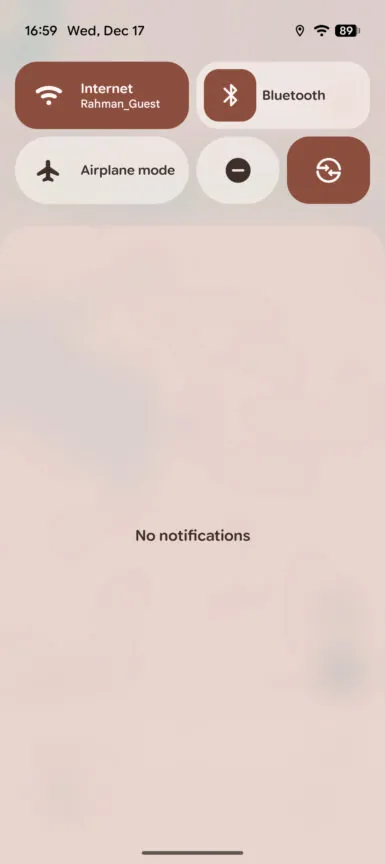
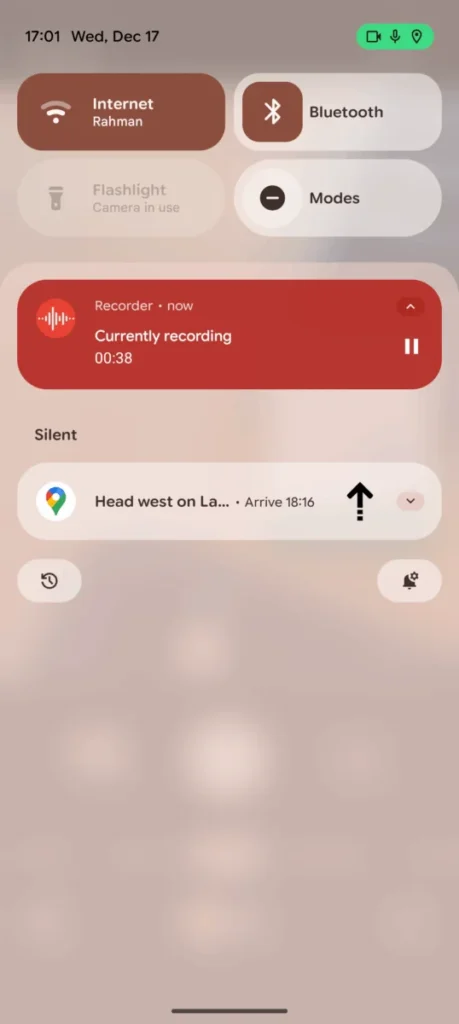
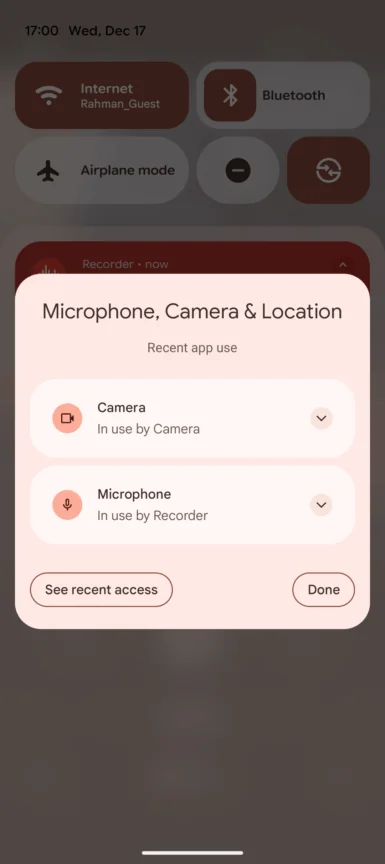
When tapped, Android opens a new dialog titled:
“Microphone, Camera & Location”
This panel shows:
- 📱 Exact app names using location
- 🔁 Whether access is foreground or background
- 🛑 Buttons to Close the app
- ⚙️ Options to Manage access
- 📜 A shortcut to Recent permission activity
This makes location tracking clear, immediate, and actionable.
🔐 Clearer, More Actionable Privacy Signals
When multiple permissions are being accessed (camera, mic, and location), the indicator turns green, while still displaying the relevant symbol.
Once tapped:
- Android lists all active permissions
- Shows which apps are using what
- Gives users instant control without digging into settings
This is especially important because location data is one of the most sensitive types of personal information handled by smartphones.
👀 Why This Android 16 Feature Matters
Previously, Android only showed a generic location icon, leaving users guessing which app was responsible.
With Android 16 QPR3:
- You can immediately spot unexpected location access
- Weather, social media, or navigation apps are easier to audit
- Background tracking becomes far more transparent
For everyday users, this reduces the risk of silent or unwanted tracking.
📱 Availability & Release Timeline
- Currently available in Android 16 QPR3 Beta 1
- Limited to eligible Google Pixel devices
- Part of Google’s beta testing program
📅 Expected stable release:
👉 Early 2026, alongside broader Android 16 updates
Google is also expected to expand its Privacy Dashboard with more detailed historical summaries of app permissions in future updates.
📡 Bonus: Improved Wi-Fi Controls
Android 16 QPR3 Beta 1 also introduces:
- More granular Wi-Fi sharing controls
- Better visibility into wireless network behavior
These changes continue Google’s push toward greater user control and transparency.
🧠 Final Thoughts
Android 16’s tappable location indicator may seem like a small UI change, but it’s a huge privacy win. By showing exactly which apps are tracking your location in real time, Google is giving users the tools they need to stay informed and in control.
As privacy expectations continue to rise, features like this will likely become essential, not optional.
❓ FAQs
What is the new location indicator in Android 16?
It’s a tappable status bar icon that shows which apps are accessing your location in real time.
Can I see which app is tracking my location?
Yes. Tapping the location indicator reveals the app names and their permission usage.
Is this feature available on all Android phones?
No. It’s currently available only on Pixel devices running Android 16 QPR3 Beta 1.
When will Android 16 QPR3 be released publicly?
Google is expected to roll out the stable version in early 2026.
Does Android 16 still show camera and microphone indicators?
Yes. Android 16 combines camera, microphone, and location indicators into a unified privacy system.
About the Author
Anish is the founder of TechBoltX, sharing mobile gaming rewards, guides, and daily updates.