 ByAnish

How to Tell If a Video Is Real or AI: Detection Guide
By Anish | Updated: November 16, 2025, | TechBoltX
???? Deepfake Videos Are More Realistic Than Ever — Here’s How to Tell What’s Real and What’s AI
AI-generated videos used to be easy to spot—strange faces, glitchy hands, or stiff movements. But in 2025, tools like OpenAI’s Sora and Sora 2 have pushed deepfakes into a new era. Today, AI videos can look indistinguishable from real footage, complete with natural lighting, realistic voices, smooth camera motion, and even emotional expressions.
Sora 2, the invite-only, TikTok-style app filled with 100% AI videos, shows just how fast this technology is advancing. The videos inside the app look so authentic that many viewers can’t tell the difference without slowing down, pausing, or checking metadata.
If you want to protect yourself from misinformation, scams, or fake viral clips, here are the most reliable ways to check whether a video is real or AI-generated.
☁️ 1. Look for Watermarks (But Don’t Rely on Them Alone)
Most AI video tools now embed watermarks to help users identify synthetic content.
For example:
- Sora videos carry a bouncing white cloud watermark
- Gemini embeds invisible C2PA tags
- TikTok and Meta apply “AI-generated” labels when detected
Watermarks help, but the problem is simple:
❌ They can be cropped
❌ They can be blurred
❌ Some apps remove them automatically
So, if a watermark is present, it’s a helpful clue.
If it’s missing, you still can’t assume the video is real.
???? 2. Check the Metadata (The Most Reliable Indicator)
Every video contains hidden data known as metadata, which includes:
- Device used
- Date & time
- Editing software
- C2PA authenticity info
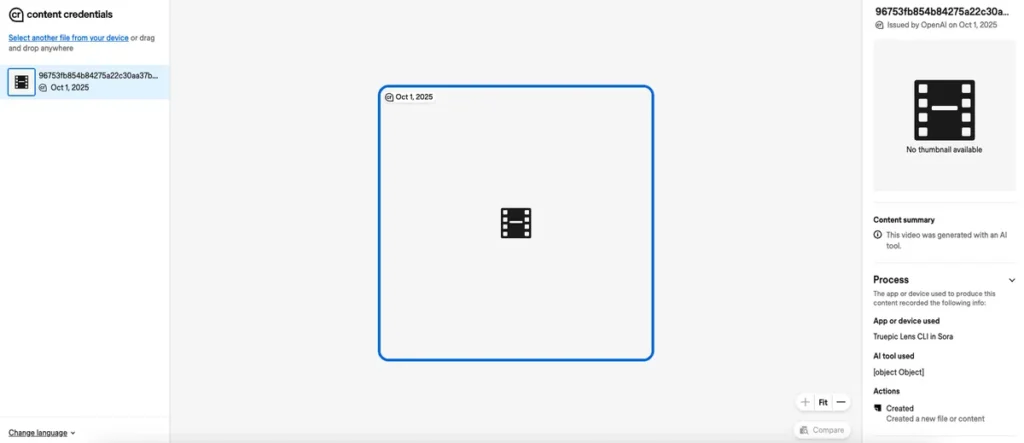
Sora, in particular, embeds C2PA credentials that clearly mark videos as AI-generated.
You can check this easily:
How to check metadata:
- Go to: https://verify.contentauthenticity.org
- Upload the video
- View the “Content Summary”
- Look for tags such as “Issued by OpenAI” or “AI-generated”
This method is extremely accurate unless the video was:
- Re-exported
- Screen recorded
- Edited in a third-party tool
- Run through watermark-removal apps
Still, it’s the strongest verification method available today.
???? 3. Watch for AI Artifacts and “Impossible Physics”
Even the most advanced models make mistakes that the human eye can catch:
???? Signs a video might be AI-generated:
- Hands suddenly change shape
- Text looks warped, misspelled, or unreadable
- Shadows move incorrectly
- Objects disappear or “melt”
- Hair clips through shoulders
- Reflections look wrong
- Lip-sync drifts from speech
- Gravity behaves strangely
AI is great at faking scenes — but still struggles with physics, persistence, and fine motor realism.
If something feels off, trust your instinct.
???? 4. Check AI Labels on Social Platforms
Meta, YouTube, and TikTok are now actively scanning uploads and tagging:
- “AI-generated”
- “Digitally created”
- “Synthetic media”
These labels are not perfect, but they’re improving every month.
If a platform labels something as AI, assume it’s correct.
????️ 5. Look for Creator Disclosure (When Available)
Some creators voluntarily tag their content as AI-generated.
This isn’t guaranteed, but when people choose to be transparent, it’s your easiest confirmation.
⚠️ 6. Trust Your Gut — If It Looks Too Wild to Be Real, It Probably Is
There’s no single perfect detection method.
Your best defense is a combination of:
- Critical thinking
- Metadata checking
- Platform labels
- Technical artifacts
- Watermark patterns
Even trained experts get fooled sometimes — so don’t feel bad if AI videos trick you.
What matters is staying cautious and verifying before believing.
❓ FAQs
1. Are deepfake videos always AI-generated?
Yes. Deepfakes are created using AI models that simulate faces, voices, and environments.
2. Can Sora videos be detected?
Most Sora videos contain C2PA metadata, making them easier to verify using authenticity tools.
3. What’s the easiest way to tell if a video is fake?
Look for physics errors, strange hand movements, or text distortions — common AI artifacts.
4. Can deepfakes fool biometric systems?
High-quality deepfakes can trick some facial-recognition tools, but not modern multi-factor systems.
5. What’s the safest method to confirm authenticity?
Using metadata verification (C2PA) is currently the most reliable method.