 ByAnish

Google Play Store Deletes 77 Malicious Apps—Check Your Phone
Google Confirms Play Store App Deletions—Remove These Apps From Your Phone
Google has confirmed the removal of 77 malicious apps from the Play Store, highlighting an ongoing effort to clean up the platform. Over the last year, the company has removed nearly four million apps, averaging around 11,000 app removals per day.
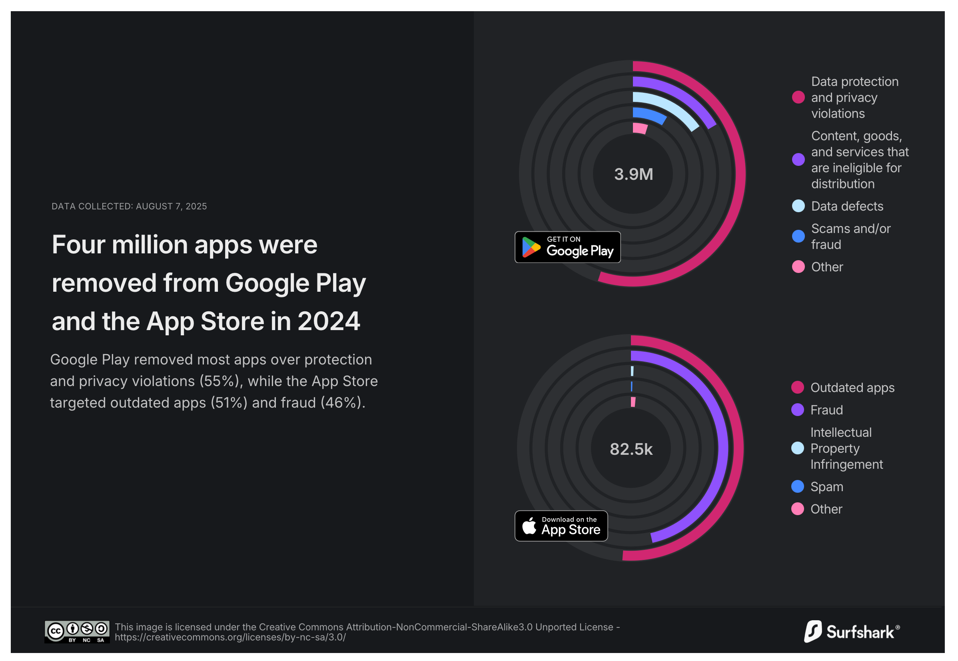
These deletions were primarily due to data protection and privacy violations, according to Surfshark and Google’s Play Store transparency reports.
Why Apps Are Removed
Apps may be removed from Play Store for multiple reasons:
- Violating privacy and data protection policies
- Containing malware or spyware
- Breaching Google’s developer guidelines
Even if an app is removed from the Play Store, it may still remain on your device. This is critical because:
- Apps cannot be updated, leaving devices vulnerable
- Security patches cannot be applied
- Old apps may continue collecting data or pose risks
How to Protect Your Phone
If you notice apps that are no longer available on Play Store:
- Uninstall deleted apps immediately to ensure your device stays secure
- Review app permissions before downloading new apps
- Stick to verified developers and well-known apps
- Use Play Protect to detect potential threats automatically
Upcoming Play Store Improvements
Google is testing a dedicated ‘Uninstall’ button on individual app listings. This will allow users to:
- Remove apps directly from the Play Store interface
- Potentially uninstall apps from multiple devices remotely
- Simplify mobile security management
Currently, uninstalling apps remotely requires visiting “Manage apps & devices”, selecting each app individually, and removing them one by one.
Latest Threats
Zscaler’s ThreatLabz team confirmed that the 77 removed apps belonged to various malware families, collectively accounting for over 19 million installs. Some of the malicious apps targeted financial institutions worldwide, highlighting the critical importance of vigilance.
Final Advice
With Google Play Store continuing its massive purge of unsafe apps, it’s essential for users to take responsibility for device safety. Remove unused or suspicious apps, enable Play Protect, and regularly review permissions to stay secure.
Your mobile security depends on proactive action—don’t wait for apps to compromise your privacy.